






Enterprise mobile app development is the end-to-end process of designing, engineering, securing, and deploying mobile applications built specifically for large-scale business operations – integrating with corporate infrastructure like ERP, CRM, and HRMS, enforcing strict compliance standards, and serving thousands of users simultaneously across complex organisational hierarchies.
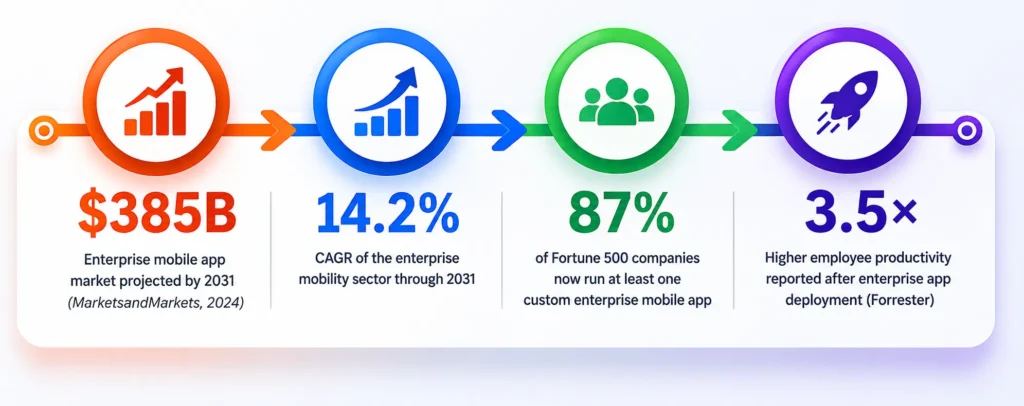
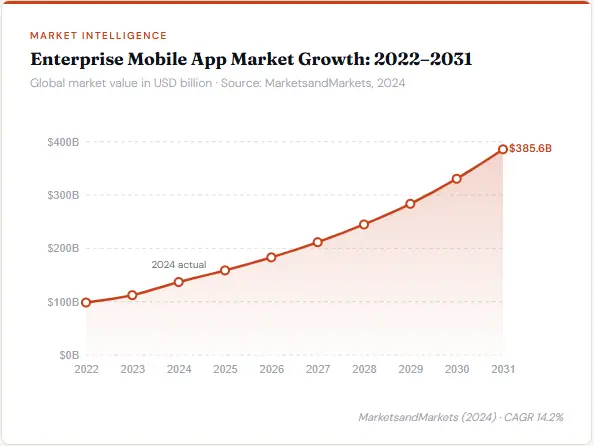
The enterprise mobile app development market was valued at $136.84 billion in 2024 and is projected to reach $385.56 billion by 2031 (MarketsandMarkets, 2024). This explosive growth reflects a fundamental shift in how large organisations operate: the workforce is mobile, field teams need real-time data, and legacy desktop-first systems are no longer fit for purpose.
But enterprise apps are not just “big consumer apps.” They are an entirely different category of software – built for complexity, scale, compliance, and deep integration with the technology stack your business already runs on. Getting this wrong costs companies crores in rework, security breaches, and failed adoption. Getting it right multiplies operational efficiency and delivers measurable ROI within the first year.
This guide covers every dimension a CTO, IT head, or business founder needs to evaluate before commissioning enterprise mobile app development – from architecture decisions to cost breakdowns, security frameworks to vendor selection criteria. It is built on Pavans Group’s experience delivering 200+ enterprise mobility projects across manufacturing, logistics, healthcare, and BFSI sectors.
What is Enterprise Mobile App Development?
Enterprise mobile app development is the disciplined practice of building purpose-built mobile software for business environments – where the app must serve not just one user but entire departments, divisions, and sometimes partner ecosystems, all while remaining secure, compliant, and integrated with the organisation’s existing digital infrastructure.
Unlike a consumer app where success is measured by downloads and daily active users, enterprise app success is measured by adoption rates within a defined workforce, reduction in process friction, integration reliability, and ROI in operational cost savings. The users are employees, field agents, logistics coordinators, compliance officers, and customer-facing representatives – each with highly specific workflow requirements.
A factory floor inventory app. A bank’s relationship manager CRM. A hospital’s ward round documentation tool. A construction firm’s project inspection platform. These are all enterprise mobile applications – and each one must integrate with backend systems that have been running for decades, while meeting the security bar that enterprise IT teams and regulators demand.
Why this matters right now: India’s enterprise mobile app market is growing at over 18% year-on-year, driven by the Manufacturing sector’s digital transformation push and BFSI compliance mandates under RBI and SEBI regulations. Companies that deploy well-built enterprise apps are pulling ahead of competitors still dependent on manual processes and paper trails.
Types of Enterprise Mobile Applications
Enterprise apps are not monolithic. Before development begins, it is critical to identify which category of enterprise app you are building – because each carries different architecture requirements, integration depth, security standards, and budget expectations.
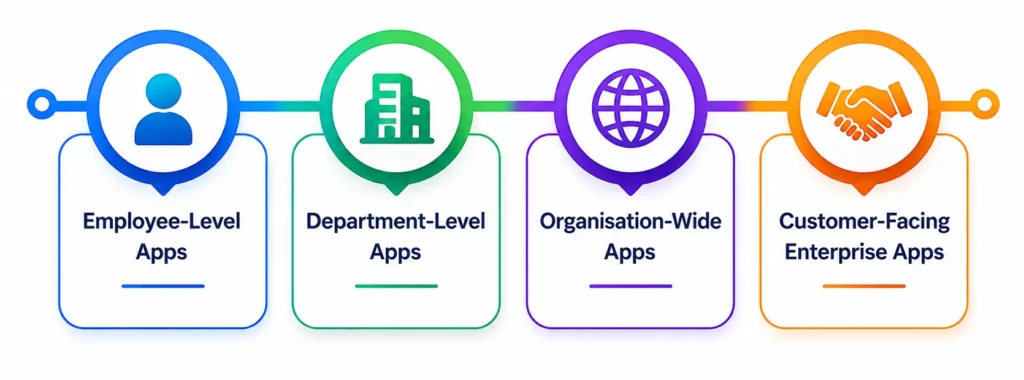
Employee-Level Apps
Individual productivity tools designed for day-to-day task management, communication, attendance tracking, and expense filing. These have the highest adoption ceiling and typically represent the lowest implementation complexity.
Examples: Expense tracker, leave management, timesheet app, internal directory, shift scheduling
Department-Level Apps
Built for a specific business unit – HR, finance, sales, or operations – and integrates with department-specific systems. These require role-based access control and data segmentation between teams.
Examples: HR management portal, compliance documentation tool, sales pipeline app, procurement approval system
Organisation-Wide Apps
Enterprise-wide platforms that integrate with ERP, BI dashboards, and cross-departmental data. These are the most complex to build and require enterprise architecture planning from day one.
Examples: ERP mobile interface (SAP, Oracle), executive analytics dashboard, multi-plant asset management, enterprise communication hub
Customer-Facing Enterprise Apps
B2B portals, partner management platforms, and dealer-facing apps that bridge the enterprise’s internal systems with external stakeholders. These require both enterprise-grade security and consumer-grade UX.
Examples: Distributor portal, B2B order management, partner onboarding app, field service customer app.
The majority of mid-market enterprise projects in India fall into the department-level category – a single division needing to move off spreadsheets and WhatsApp into a structured, integrated mobile workflow. These are typically the highest-ROI projects: constrained scope, clear pain points, and measurable before/after metrics.
Industry Use Cases (Real-World Applications)
Enterprise logistics apps integrate with Transportation Management System to:
- Track shipments in real-time
- Optimize routes
- Manage fleets efficiently
- Reduce operational costs
- Patient data management
- Telemedicine solutions
- Secure communication between doctors and patients
- Mobile banking platforms
- Fraud detection systems
- Secure financial transactions
- Inventory management
- Order tracking
- Customer engagement platforms
- Production monitoring
- Supply chain visibility
- Workforce management
How Enterprise Apps Differ from Consumer Apps
One of the most common mistakes companies make is briefing a development agency that specialises in consumer apps to build enterprise software.
| Feature | Consumer App | Enterprise App |
|---|---|---|
| Primary Users | General public (millions, anonymous) | Employees, partners, B2B clients (defined user base) |
| Security Requirements | Basic authentication, standard HTTPS | MFA, RBAC, end-to-end encryption, MDM, VAPT-tested |
| Integration Depth | Standalone or social APIs | Deep integration with ERP, CRM, HRMS, legacy databases |
| Compliance Standards | App store policies | ISO 27001, SOC 2, GDPR, RBI/SEBI regulations, HIPAA |
| Scale & Concurrency | Millions of anonymous users | Thousands of authenticated, concurrent business users |
| Customisation Level | Standard UX patterns | Custom workflows mapped to organisational processes |
| Offline Capability | Rarely required | Often mandatory (field teams, manufacturing floors) |
| Development Cost (India) | ₹3L–₹15L | ₹8L–₹60L+ |
| Support Model | Bug fixes, store updates | SLAs, dedicated support, change request management |
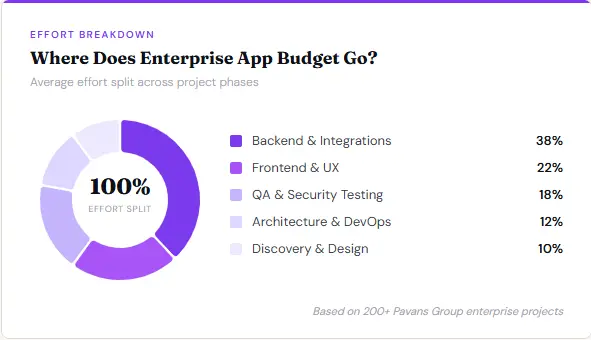
The critical distinction that budget discussions often miss is integration cost. A consumer app operates in isolation. An enterprise app must communicate with systems that were built in the 1990s, written in COBOL, sitting behind firewall layers with no REST API. Building that bridge – safely, reliably, and scalably – is often where 30–40% of enterprise app development effort actually goes.
What Features Do Enterprise Mobile Apps Need?
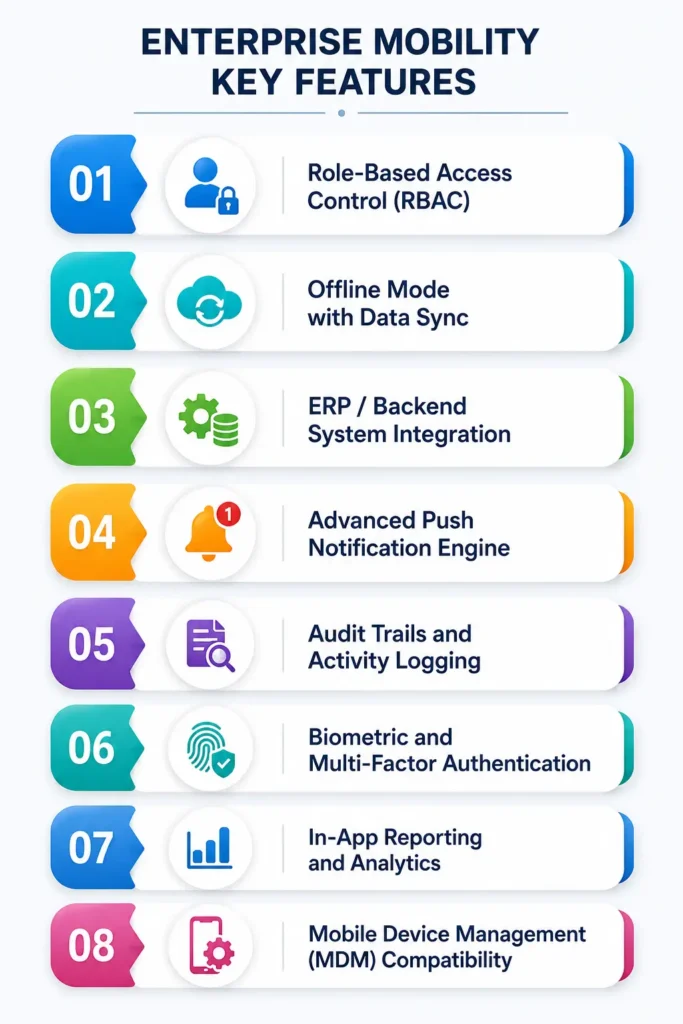
The feature set of an enterprise app is not driven by market trends or competitor benchmarking – it is driven by the specific operational workflows the app must digitise. That said, there is a core set of capabilities that every well-built enterprise application must include regardless of industry or function.
1. Role-Based Access Control (RBAC)
Every enterprise app must segment data and functionality by user role. A field sales representative should see only their pipeline data. A regional manager should see all reps in their territory. A national head should see the consolidated dashboard. RBAC is not a feature — it is the foundational architecture decision that everything else is built on. Poorly implemented RBAC is one of the leading causes of enterprise data breaches.
2. Offline Mode with Data Sync
Field agents on manufacturing floors, delivery drivers in low-connectivity zones, and healthcare workers in ward settings cannot be blocked by intermittent internet access. Enterprise apps require a robust offline-first architecture where data is stored locally and automatically synced when connectivity returns — with conflict resolution logic for concurrent edits.
3. ERP / Backend System Integration
The app must communicate with your existing system of record — whether that is SAP, Oracle, Microsoft Dynamics, Tally, or a custom-built ERP. This integration layer requires secure API design, authentication token management, data transformation logic, and error handling. For legacy systems without modern APIs, middleware bridges (MuleSoft, WSO2) are often required.
4. Advanced Push Notification Engine
Unlike consumer apps where notifications are opt-in engagement tools, enterprise notifications are operational triggers — “Your approval is required,” “Shipment delay detected,” “SLA breach in 2 hours.” Enterprise notification systems require priority tiering, delivery confirmation, and compliance with corporate communication policies.
5. Audit Trails and Activity Logging
Every action taken within the app — every record modified, approval granted, document accessed — must be logged with user ID, timestamp, and device metadata. This is mandatory for compliance in BFSI, healthcare, and government sectors, and critical for forensic investigations in the event of a security incident.
6. Biometric and Multi-Factor Authentication
Passwords alone are not sufficient for enterprise apps. Modern enterprise mobility requires layered authentication: device PIN, biometric verification (fingerprint or Face ID), and for sensitive operations, a one-time password (OTP) or hardware token. SSO (Single Sign-On) integration with corporate identity providers (Active Directory, Okta, Azure AD) is increasingly expected.
7. In-App Reporting and Analytics
Field supervisors and departmental heads need to access operational metrics directly within the app — not only on desktop dashboards. Embedded analytics with drill-down capability, date filtering, and export-to-PDF/Excel functionality dramatically increases app adoption among management-level users who would otherwise revert to desktop systems.
8. Mobile Device Management (MDM) Compatibility
Enterprise apps deployed on company-owned or BYOD (Bring Your Own Device) devices must integrate with MDM platforms like Microsoft Intune, Jamf, or VMware Workspace ONE. MDM compatibility enables remote app provisioning, remote wipe of corporate data on lost devices, and policy enforcement across the device fleet.
Bonus: Workflow Automation & AI Integration
Automation and AI integration in enterprise mobile apps is where modern enterprise solutions create the highest business value.
Key automation capabilities include:
- Task assignment and tracking
- Approval workflows
- Automated reporting
- AI-based recommendations
This reduces manual effort, minimizes errors, and improves overall productivity
Guide: AI in Mobile Apps: The Complete Guide for Businesses & Beginners
The 6-Phase Enterprise App Development Process
Enterprise app development follows a structured delivery methodology that differs significantly from startup-style agile sprints. The enterprise context legacy integrations, compliance requirements, multi-department stakeholders, and change management concerns demands a disciplined process with clearly defined gates between phases.
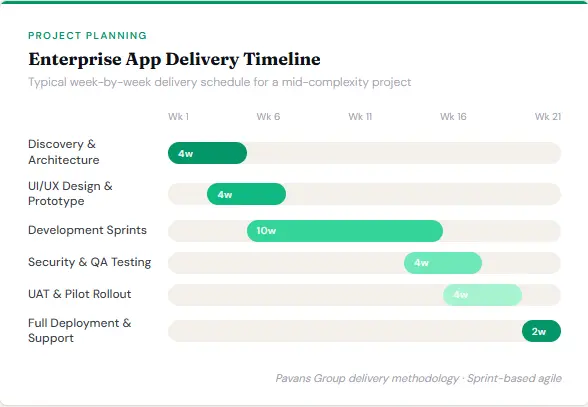
Discovery and Requirements Gathering
This is the most consequential phase and the most frequently underinvested. Discovery involves structured workshops with all key stakeholders — IT heads, process owners, end users, and compliance officers. The deliverable is a Business Requirements Document (BRD) and a Technical Architecture Specification. Every ambiguity resolved at this stage avoids 5–10x the cost of resolving it post-development. At Pavans Group, discovery typically runs 2–4 weeks and includes process mapping, existing system audits, and API availability assessments.
Architecture Design
Based on the requirements, the technical architecture team designs the system blueprint — cloud infrastructure (AWS, Azure, or GCP), database schema, API layer design, security architecture, offline sync strategy, and third-party integration architecture. For enterprise apps, scalability and security are not features bolted on after launch — they are architectural decisions made here. This phase also determines whether a cross-platform (React Native, Flutter) or native (Swift/Kotlin) approach is optimal for the specific use case.
UI/UX Prototyping
Enterprise UX is not about visual beauty — it is about cognitive efficiency for users who will use this app 6–8 hours a day. Wireframes are built for each user role, then tested with actual end users before any code is written. Interactive prototypes (Figma) allow stakeholders to validate workflow logic, catch missing edge cases, and approve navigation patterns. This phase prevents the single most common cause of enterprise app failure: building the right technology for the wrong workflow.
Agile Development Sprints
Development proceeds in 2-week sprints with functional deliverables at the end of each sprint. Each sprint addresses a specific module or user story, and stakeholders review working software — not slide decks. Enterprise development sprints are heavier on back-end integration work than typical app sprints, since connecting to legacy ERP systems, building secure API gateways, and implementing complex RBAC logic constitutes 40–60% of total development effort. Sprint reviews include IT team participation to validate integration points.
Security Testing and QA
Enterprise apps undergo a testing protocol far more rigorous than consumer apps. This includes: Functional QA (all user stories and edge cases), Performance testing (concurrent user load simulation), Security testing (VAPT — Vulnerability Assessment and Penetration Testing), Compliance validation (GDPR, ISO 27001 checklist audit), Integration regression testing (every ERP integration point retested after changes), and UAT (User Acceptance Testing) with actual end users from each role group. Security testing alone typically takes 2–3 weeks for a mid-complexity enterprise app.
Deployment and Ongoing Support
Enterprise app deployment is not a single event — it is a managed programme. Deployment includes staged rollout (pilot group → department → organisation-wide), MDM-based distribution, training material creation, and help desk preparation. Post-launch, enterprise apps require structured support SLAs — typically a 99.5% uptime guarantee, 4-hour critical bug response, and a quarterly feature review. Ongoing support contracts also cover OS version updates, security patching, and new device compatibility testing as your device fleet evolves.
Common Enterprise Mobile App Development Challenges (and How to Solve Them)
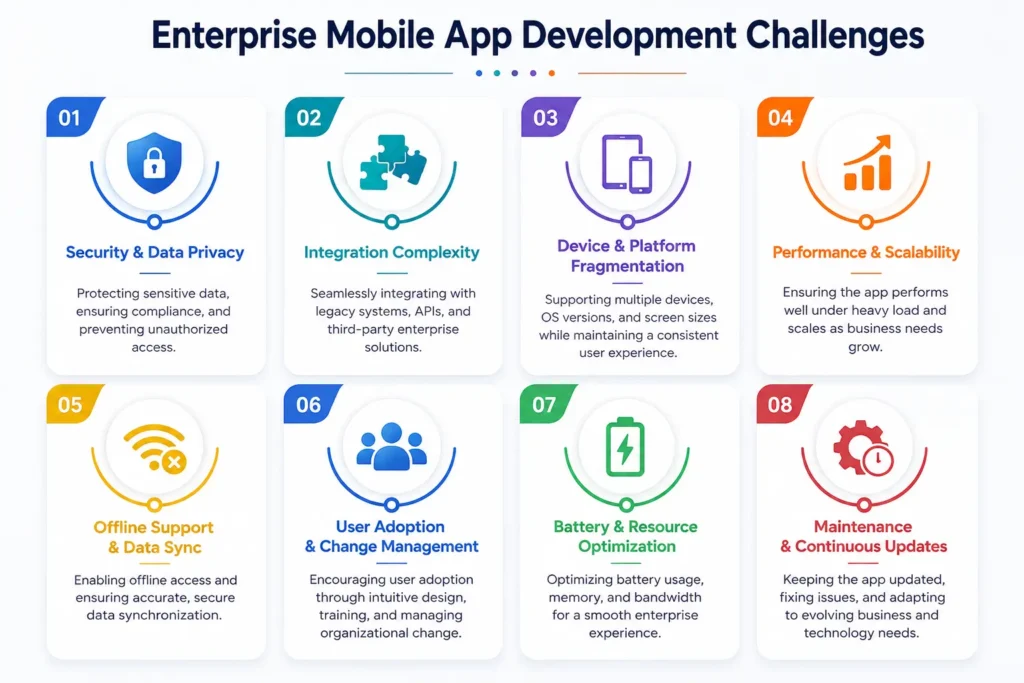
Enterprise app projects fail more frequently than consumer app projects – not because of poor technology choices, but because of underestimated organisational and integration complexity. These are the five challenges that derail the most projects, and how to address each one before they become expensive problems.
Legacy System Integration
Solution Approach
Most Indian enterprises run ERP systems that are 10–20 years old with no native REST API support. Direct database connections are insecure and brittle. The correct solution is an API middleware layer — either a custom-built API gateway or a platform like MuleSoft or WSO2 — that exposes standardised APIs from the legacy system. This adds 3–5 weeks to initial development but creates a reusable integration layer for all future digital initiatives. Never let a mobile app connect directly to a production database.
Multi-Platform Compatibility
Solution Approach
Enterprise organisations run heterogeneous device fleets — Samsung Android for field teams, iPhones for sales, iPads for supervisors, Windows tablets for logistics. Building native apps for each platform is cost-prohibitive. The solution is a cross-platform framework (React Native or Flutter) with platform-specific module overrides for features that require native access (biometrics, push notifications, MDM hooks). This delivers 80% code reuse while maintaining genuine native performance on each platform.
Data Security and Compliance
Solution Approach
Enterprise data on mobile devices is a significant regulatory and business risk. The solution is a multi-layer security architecture implemented from the architecture phase — not retrofitted. This includes: AES-256 encryption for all local data storage, TLS 1.3 for all data in transit, certificate pinning, jailbreak/root detection, secure enclave storage for credentials, and MDM integration for remote wipe. For regulated industries, VAPT testing must be conducted by an accredited third-party firm before go-live.
User Adoption
Solution Approach
The most technically perfect enterprise app fails if employees don’t use it. Low adoption is the number-one silent killer of enterprise mobility investments. The solution is to involve end users in the design process from Phase 1 (not just IT heads and managers), run a pilot with a champion user group, invest in in-app onboarding and contextual help, and track adoption metrics (daily active users by role, feature utilisation rates) in the first 90 days. Adoption is a product problem, not a change management problem — if the app is genuinely easier than the old way, users adopt it.
Scalability
Solution Approach
An enterprise app built for 50 users that needs to scale to 5,000 cannot simply be “made bigger.” Scalability must be designed into the architecture from the start — horizontally scalable cloud infrastructure (auto-scaling groups on AWS/Azure), database connection pooling, stateless API design, CDN for static assets, and asynchronous job queues for heavy processing tasks. Apps that skip this during initial development typically require a full architectural rewrite at the 2-year mark — at 70% of the original build cost.
Real Cost Breakdown: ₹8L to ₹60L+
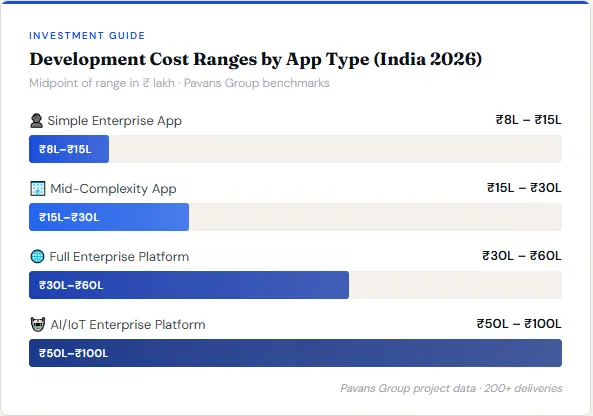
Enterprise mobile app development cost in India varies by an order of magnitude depending on complexity, integration depth, and compliance requirements. The table below reflects Pavans Group’s current pricing as of 2026, based on actual project data across 200+ deliveries. These are honest ranges, not teaser figures designed to get you on a call.
| App Type | Estimated Cost (India) | Timeline | What’s Included | Typical Tech Stack |
|---|---|---|---|---|
| Simple Enterprise App Single department, limited integration |
₹8L – ₹15L | 3–4 months | 1 platform (iOS or Android), basic RBAC, REST API integration to 1 backend system, standard auth, basic reporting | React Native, Node.js, PostgreSQL, AWS |
| Mid-Complexity App Multi-department, multiple integrations |
₹15L – ₹30L | 4–7 months | iOS + Android, advanced RBAC, 2–4 ERP/CRM integrations, offline mode, push notifications, embedded analytics, MDM compatibility | Flutter or React Native, Java/Node.js microservices, MySQL/MongoDB, Azure |
| Full Enterprise Platform Organisation-wide, AI/IoT integration |
₹30L – ₹60L+ | 7–12 months | iOS + Android + tablet, complex workflow engine, AI/ML features, IoT device integration, full compliance (ISO 27001, GDPR), VAPT, SSO, custom MDM setup, training programme |
Native iOS/Android + Flutter, Python microservices, PostgreSQL + Redis, AWS multi-region |
What drives cost beyond the base: Each additional ERP integration adds ₹1.5L–₹3L. Third-party compliance certification (ISO 27001 audit support) adds ₹2L–₹4L. AI/ML feature development (anomaly detection, predictive analytics, NLP) adds ₹5L–₹15L depending on model complexity. IoT integration (manufacturing sensors, GPS tracking, RFID) adds ₹3L–₹8L.
Hidden Costs Most Vendors Don’t Disclose
Beyond development, budget for: Cloud infrastructure (₹40K–₹2L/month depending on scale), Third-party API licenses (mapping services, SMS OTP, analytics SDKs – ₹50K-₹3L/year), Annual support contract (typically 15–20% of build cost per year), OS update compatibility (iOS and Android release major updates annually – your app must be tested and updated each year), and User training (often underbudgeted at 5–10% of development cost).
This is one reason why many global businesses choose an enterprise mobile app development company in India to reduce costs while maintaining high-quality development standards.
Pavans Group pricing includes a 12-month warranty period covering bug fixes, security patches, and compatibility updates – not all vendors include this. Always clarify what happens after go-live before signing a contract.
Tech Stack & Framework Recommendations for Enterprise Apps
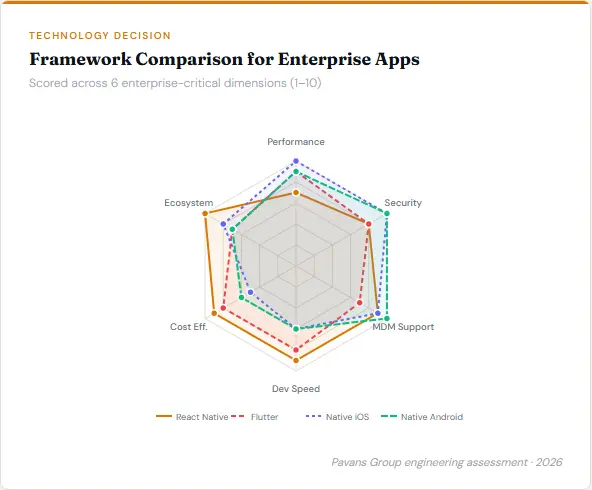
Framework selection is one of the most consequential technical decisions in building an effective Enterprise Mobile App Tech Stack. The wrong choice creates performance bottlenecks, security gaps, or vendor lock-in that surfaces at the 2-year mark. Here is how we approach this decision at Pavans Group, based on actual enterprise project data.
| Framework | Best For | Advantages | Limitations |
|---|---|---|---|
| React Native | Cross-platform, rapid iteration, team reuse | Huge ecosystem, over-the-air updates, strong MDM support, lower cost | Performance drops on heavy animations, bridging overhead for native modules |
| Flutter | Pixel-perfect UI, tablet apps, growing enterprise adoption | Compiled native, consistent UI across platforms, excellent performance | Dart learning curve, smaller ecosystem than RN, less MDM tooling |
| Native iOS (Swift) | High-security, performance-critical, iOS-only | Maximum performance, full iOS framework access, best biometric integration | iOS-only, higher cost, separate Android development required |
| Native Android (Kotlin) | Enterprise Android device fleets (Samsung Knox, Zebra) | Full Android API access, deep MDM integration, best for device-specific hardware | Android-only, fragmentation across device manufacturers |
Our recommendation for most Indian enterprise clients in 2026: React Native for cross-platform apps serving iOS and Android, Flutter where tablet UI is a primary use case, and native development only when hardware-specific integrations (NFC, industrial barcode scanners, biometric terminals) are central to the app’s core function. For backend, a Node.js or Java microservices architecture with a PostgreSQL primary database and Redis caching layer on AWS or Azure is the most battle-tested enterprise configuration we deploy.
Enterprise App Security Framework
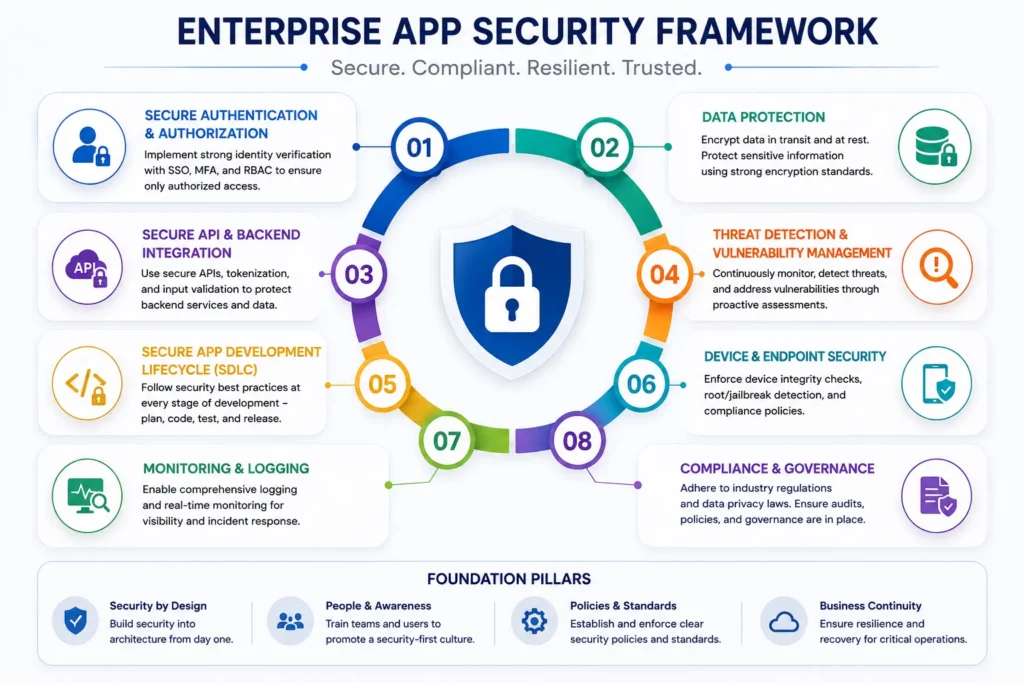
Enterprise mobile app security is not a checklist item – it is a continuous, layered discipline. A single security gap in an enterprise app can expose thousands of employee records, compromise financial data, or create a regulatory liability under GDPR, RBI guidelines, or sector-specific regulations.
Here is the security framework Pavans Group implements on every enterprise project.
Layer 1 – Data Security
At rest: All sensitive data stored on the device (cached API responses, user session data, offline records) must be encrypted using AES-256 within a secure enclave. Plain-text storage in SQLite databases or shared preferences is never acceptable for enterprise data. In transit: All API communication uses TLS 1.3 with certificate pinning enabled – preventing man-in-the-middle attacks that intercept traffic even over HTTPS. API keys and secrets are never hard-coded in the app binary; they are fetched from a secure secrets management service (AWS Secrets Manager, HashiCorp Vault) at runtime.
Layer 2 – Authentication and Identity
Enterprise apps must support Multi-Factor Authentication (MFA) as a baseline. For corporate deployments, Single Sign-On (SSO) integration with the organisation’s identity provider (Microsoft Azure AD, Okta, LDAP) means employees use their corporate credentials — and when they leave the organisation, access is revoked instantly at the IdP level without touching the mobile app. Biometric authentication (fingerprint, Face ID) using the device’s secure biometric hardware is implemented as the primary unlock mechanism for subsequent sessions.
Layer 3 – Application Security
The app binary itself must be hardened: code obfuscation prevents reverse engineering, root/jailbreak detection blocks execution on compromised devices, and screenshot prevention prevents sensitive data capture. Runtime Application Self-Protection (RASP) hooks detect and terminate the app if tampering is detected during execution. These measures are standard practice in BFSI and healthcare enterprise apps and are increasingly required in other sectors.
Layer 4 – Network and Infrastructure Security
All API calls route through a dedicated API gateway (AWS API Gateway, Kong) that enforces rate limiting, IP whitelisting, and request validation. The mobile app never communicates directly with application servers or databases. Infrastructure is deployed in private subnets with security groups restricting inbound traffic to the API gateway only. Web Application Firewall (WAF) rules filter malicious request patterns.
Layer 5 – Compliance and Audit
Comprehensive audit logging captures every data access event, configuration change, and authentication event with immutable timestamps. For compliance-regulated industries, Pavans Group conducts a third-party VAPT (Vulnerability Assessment and Penetration Testing) engagement before go-live, producing a signed security clearance report that satisfies most enterprise IT security committees and regulatory auditors.
How to Choose an Enterprise App Development Company
Choosing the wrong development partner is the most expensive mistake you can make in an enterprise app project. A vendor who underdelivers forces you to either accept a substandard product or pay for a rebuild – at 60–80% of the original project cost. These are the criteria that separate enterprise-capable development partners from consumer app studios that have overstated their enterprise credentials.
Portfolio in your industry, specifically with enterprise integrations: Ask to see 2–3 case studies with documented ERP/CRM integrations similar to your tech stack. Consumer app portfolios do not transfer to enterprise delivery capability.
Security certifications and VAPT track record: Ask whether their team has delivered ISO 27001-compliant apps and whether they have relationships with accredited VAPT firms. A vendor who cannot answer these questions has not done enterprise security work at the level you need.
Post-launch support policy with documented SLAs: Get the support contract in writing before signing the development contract. Minimum: 99.5% uptime SLA, 4-hour critical bug response, 12-month warranty on all delivered code.
IP ownership terms — you must own the code outright: Some vendors retain code ownership as leverage for ongoing billing. Your contract must specify that all source code, IP, and assets are transferred to you upon final payment, with no licence conditions.
Sprint-based delivery with working software at each milestone: Avoid vendors who ask for large upfront payments against a 6-month delivery promise with no interim deliverables. Demand working, demonstrable software at the end of every sprint (2 weeks) from day one of development.
Dedicated project manager and technical lead, named in the contract: “Bait and switch” — where senior engineers present in the sales process are replaced by junior developers during delivery — is endemic in the Indian IT market. Name your project manager and technical lead in the Statement of Work.
India-based team with local communication (no timezone issues): Enterprise projects involve frequent stakeholder discussions, rapid feedback loops, and occasional on-site visits. A Vadodara or Gujarat-based team reduces communication overhead that compounds into weeks of delay on offshore projects.
Client references in the enterprise segment: Request contact details for 2–3 reference clients in similar industries. A vendor who cannot provide references from enterprise clients is signalling that their enterprise portfolio is thin or their client relationships are poor.
Expected Timeline to Delivery
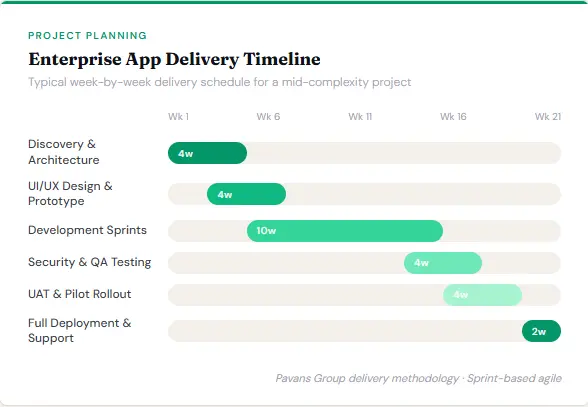
One of the most common miscalibrations in enterprise app planning is timeline expectations. Vendor timelines presented in sales proposals are almost always optimistic – they assume smooth stakeholder decisions, available IT resources on the client side, and no legacy integration surprises. The timeline below reflects actual Pavans Group delivery data, not sales estimates.
Stakeholder workshops, process mapping, BRD, technical architecture, API audit, security design.
Weeks 3–6
Wireframes per user role, interactive Figma prototype, stakeholder approval round, design system creation.
Weeks 5–16
Bi-weekly sprints; core modules first, then integrations, then advanced features. Sprint reviews with IT and business stakeholders
Weeks 14–18
Functional QA, security testing, load testing, compliance audit, user acceptance testing with champion users.
Weeks 18–20
Staged rollout to pilot user group, training, feedback collection, rapid iteration on critical UAT findings.
Week 20+
Organisation-wide deployment via MDM, help desk activation, 30/60/90 day adoption monitoring, support SLA commences.
The single biggest timeline risk: Client-side delays. Legacy system API documentation that doesn’t exist. IT security committee reviews that add 4–6 weeks. Stakeholder decisions on scope that require rework. At Pavans Group, we build a 15% timeline buffer into every contract and track client-side dependencies on a shared project dashboard so nothing surprises either side.
Real-World Case Study
Enterprise-level Health Care App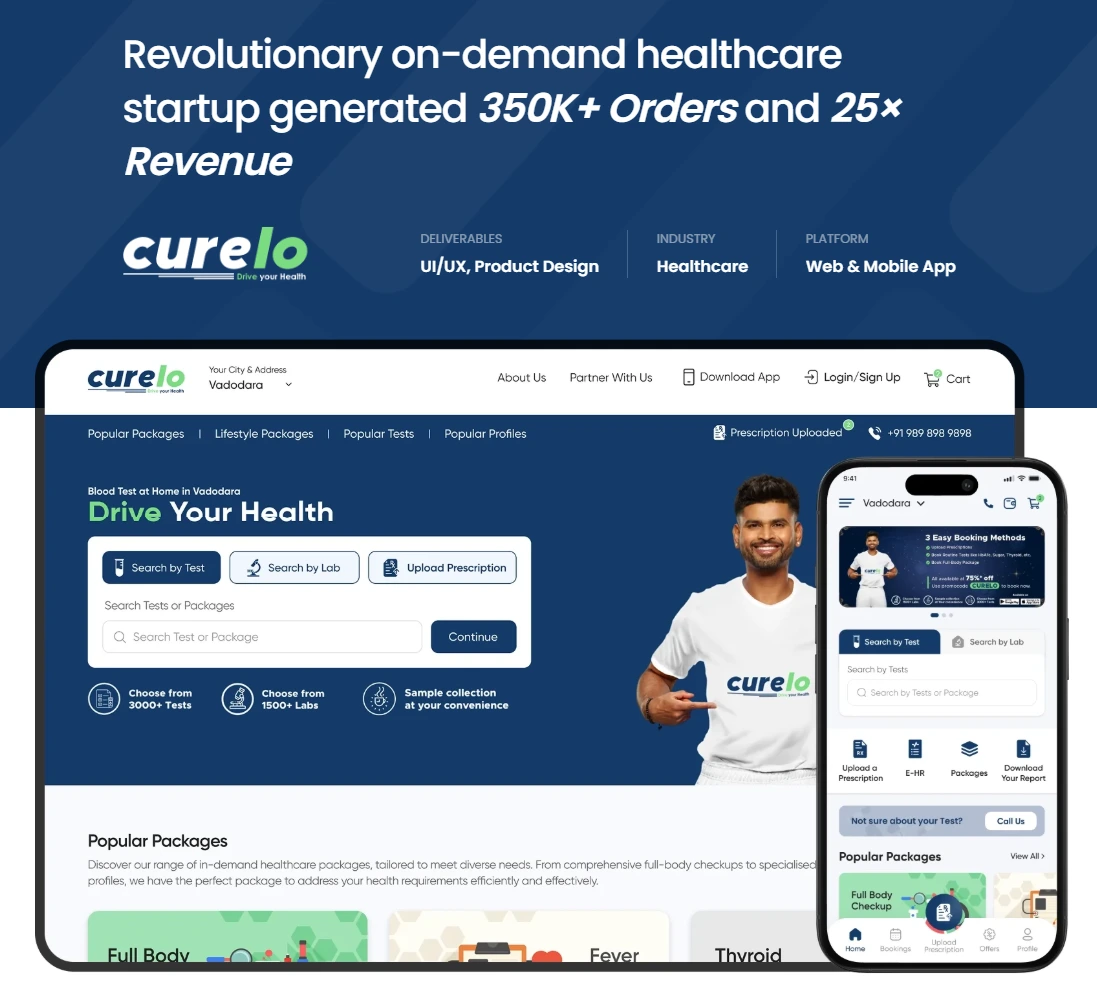
This project demonstrates how enterprise mobile solutions can improve operational efficiency, streamline workflows, and enable scalable digital platforms, making it one of the valuable real-world enterprise app case studies for businesses planning digital transformation initiatives.
FAQ’s:
1. What is enterprise mobile app development?
Enterprise mobile app development is the process of designing, building, deploying, and maintaining mobile applications specifically tailored for large-scale business operations. Unlike consumer apps, enterprise apps integrate with corporate systems such as ERP, CRM, and HRMS, follow strict security and compliance standards, and are designed to support thousands of internal or external users efficiently. The focus is on optimizing organizational workflows rather than individual user convenience.
2. How much does enterprise mobile app development cost in India?
In India, enterprise mobile app development typically ranges from ₹8 lakh to ₹60 lakh+, depending on complexity and integration needs. Simple apps cost around ₹8L–₹15L and take 3–4 months to build. Mid-level applications with multiple integrations range from ₹15L–₹30L over 4–7 months. Highly complex enterprise platforms involving AI, IoT, and compliance requirements can cost ₹30L–₹60L+ and take 7–12 months or more. Ongoing costs such as cloud hosting and maintenance are usually additional.
3. How long does it take to build an enterprise mobile app?
The development timeline for enterprise mobile apps generally ranges from 3 to 12+ months. Simple applications can be delivered within 3–4 months, while moderately complex apps take 4–7 months. Large-scale enterprise platforms with multiple integrations and advanced features may require 7–12 months or longer. A phased or sprint-based delivery approach is often used to provide early business value before full completion.
4. What is the difference between enterprise and consumer apps?
Consumer apps are designed for general users and prioritize usability, engagement, and simplicity, often without deep backend integrations. Enterprise apps, on the other hand, are built for specific business users such as employees or partners and integrate deeply with enterprise systems like ERP and CRM. They include advanced security, compliance requirements, role-based access, offline functionality, and centralized management, making them more complex and resource-intensive.
5. Which framework is best for enterprise app development?
The choice of framework depends on business needs. React Native is widely used for cross-platform enterprise apps due to its flexibility and strong ecosystem. Flutter is preferred for high-performance, visually rich applications, especially on tablets. Native development using Swift for iOS and Kotlin for Android is ideal for performance-critical or highly secure applications. In most enterprise cases today, React Native and Flutter provide the best balance of cost, speed, and scalability.
6. How do you ensure security in enterprise mobile apps?
Enterprise mobile app security is implemented through multiple layers, including AES-256 encryption for stored data, TLS 1.3 for secure communication, multi-factor authentication, single sign-on integration, and role-based access control. Additional protections include jailbreak/root detection, secure APIs, and integration with mobile device management (MDM) systems. Regular vulnerability assessments and compliance with standards like ISO 27001 and SOC 2 further strengthen security.
7. Can enterprise mobile apps integrate with SAP or Oracle ERP?
Yes, enterprise mobile apps can integrate with ERP systems like SAP, Oracle, Microsoft Dynamics, and Tally using REST APIs, SOAP services, or middleware platforms such as MuleSoft and WSO2. SAP integrations are often handled via SAP BTP or SAP Mobile Platform, while Oracle integrations use Oracle Integration Cloud. For legacy systems without APIs, custom API layers can be developed to securely bridge mobile apps with backend systems without modifying core infrastructure.
Ready to Build Your Enterprise App?
Talk to Pavans Group’s enterprise mobility team. We’ll map your requirements, assess your integration stack, and give you an honest cost and timeline estimate – no obligation, no sales pressure.